Takealot Keyword Reverse Guide: Find Competitor Keywords with Revenuealot
When a competitor keeps outranking you on Takealot, the hardest part is usually not the ranking itself. It is the missing keyword evidence behind it.
Many sellers have already updated titles, improved images, adjusted pricing, and tested ads. But without clearer keyword evidence, the work can still feel like repeated guesswork.
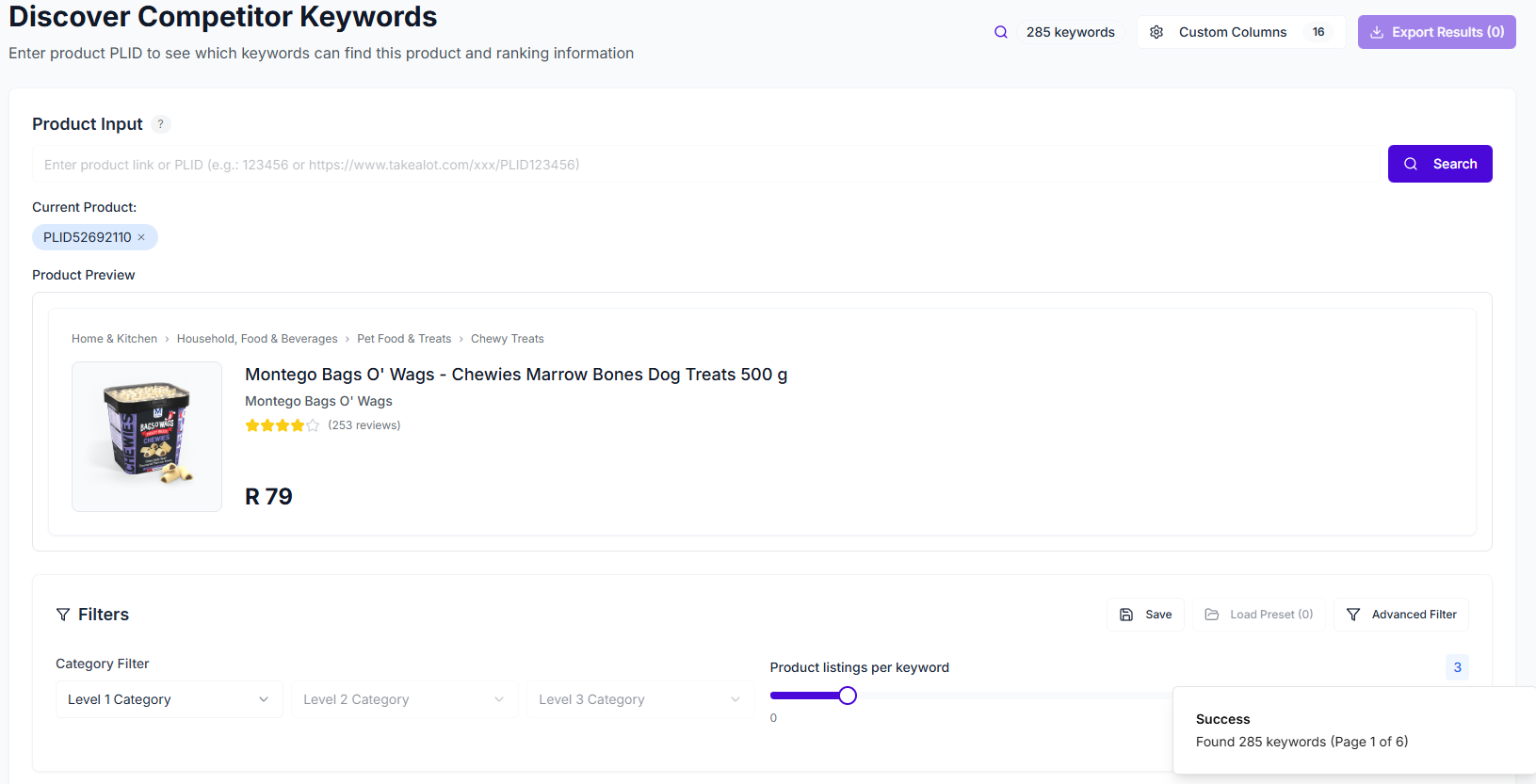
That is where Revenuealot Keyword Reverse helps. By entering a competitor product URL or PLID, you can see which keywords surface that product, where it ranks organically, whether it appears in ad placements, and how difficult those terms may be to compete on.
If you want the feature walkthrough while you read, start with the Keyword Reverse docs. If you are ready to inspect a competitor now, go straight to Keyword Reverse.
Quick answer: how do you find the keywords your competitors rank for on Takealot?
The fastest way is to start from a real competing product instead of a blank spreadsheet.
With Keyword Reverse, you can inspect:
- the keywords where a competitor has natural ranking
- the keywords where it appears in ad placements
- category context for those keywords
- competitor count, CPC, CPM, CTR, and ranking difficulty
That matters because the goal is not to collect more keywords. The goal is to identify which terms already have market proof and which ones are realistic for your product to target next.
Most sellers do not lack keywords. They lack evidence about which keywords matter
This is the real problem behind many weak listing optimization efforts.
The issue is usually not "we could not think of enough terms." It is:
- not knowing which competitor keywords actually drive visibility
- not knowing whether those keywords are organic strengths or ad-supported positions
- not knowing which terms are too competitive right now
- not knowing which keywords fit your product closely enough to deserve action
Keyword Reverse helps close that gap because it starts with real ranking behavior rather than brainstorming alone.
Start with organic ranking before you make ad decisions
When sellers first open keyword data, it is tempting to jump straight to bids and traffic signals. Those matter, but the cleaner first question is:
- where does this competitor already show up organically?
Organic ranking is useful because it helps you see:
- which keywords are likely part of the product's core relevance
- whether the competitor is visible on a narrow set of terms or a broad footprint
- which terms may deserve listing work before you spend ad budget chasing them
If a competitor has consistent organic visibility on a keyword that strongly matches your product, that is usually a term worth examining carefully.
Ad ranking, bids, and difficulty tell you how expensive the fight may be
Once you understand where the competitor has visibility, the next layer is to ask how hard that visibility may be to challenge.
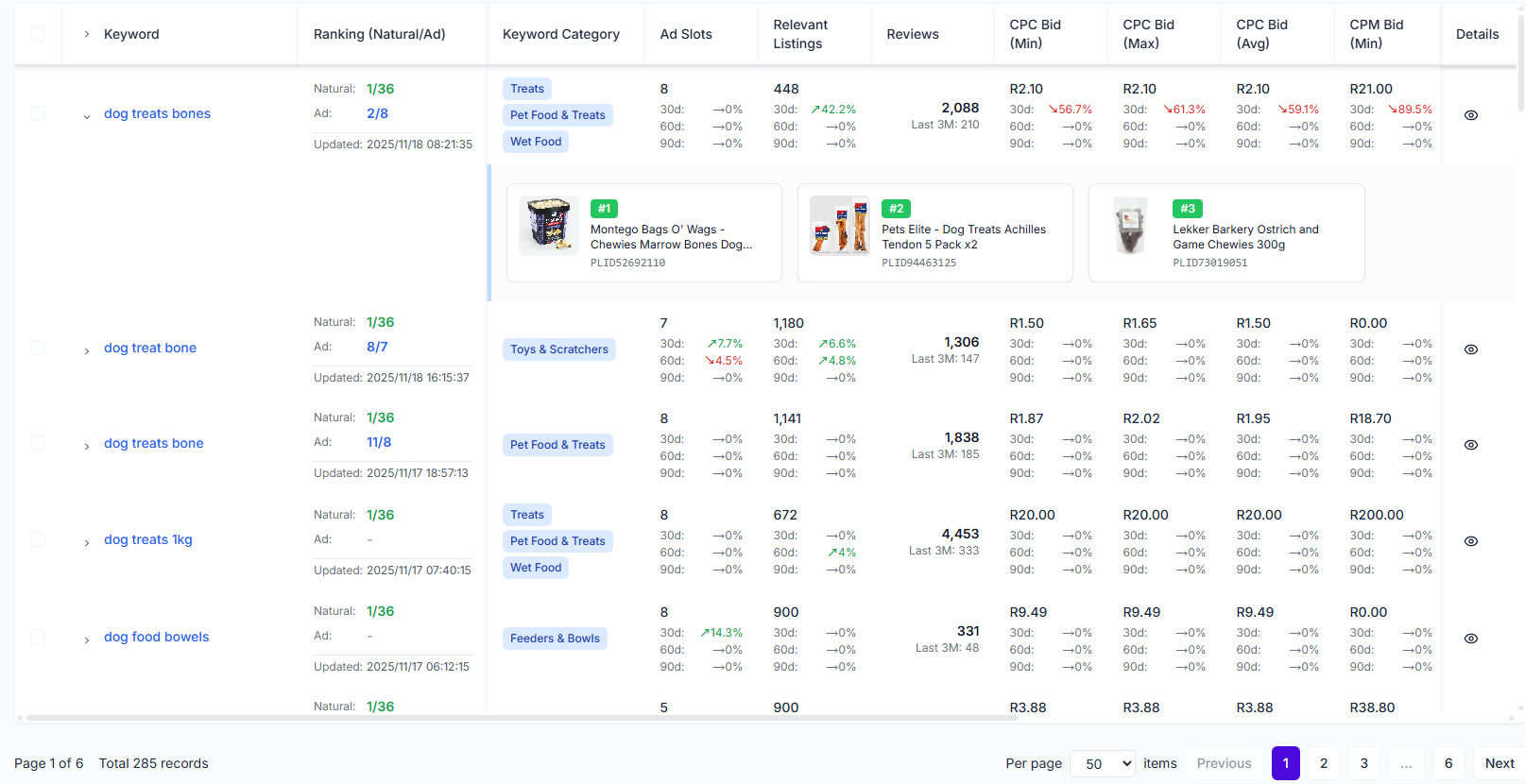
Keyword Reverse gives you that context through:
- ad ranking
- CPC range
- CPM range
- CTR data
- ranking difficulty
- competitor count
Signal in Keyword Reverse | What it tells you | How to use it |
|---|---|---|
Natural ranking | Where the competitor wins unpaid visibility | Prioritize terms for listing optimization |
Ad ranking | Whether the competitor is defending the term through ads | Decide if paid competition is already active |
Competitor count | How crowded the keyword is | Avoid assuming every relevant keyword is realistic now |
CPC and CPM | Likely cost pressure | Judge whether the term fits your budget |
CTR data | Whether the keyword tends to attract interaction | Helps assess traffic quality alongside relevance |
Ranking difficulty | How hard it may be to win visibility | Separate near-term targets from long-term targets |
A long keyword list is not the goal
One of the easiest mistakes is to export a large keyword set and treat every returned term like an opportunity.
That usually creates messy titles, diluted listings, and ad spend spread across too many weak bets.
A better approach is to split the returned keywords into four groups:
- core terms that fit your product closely and already show strong competitor visibility
- expansion terms that are relevant, but need the right supporting content
- watchlist terms that are valuable but very competitive
- discard terms that may work for the competitor but do not fit your offer well
That is how competitor keyword research becomes useful for decisions instead of just producing a bigger spreadsheet.
How to turn competitor keyword data into better listing decisions
1. Start with two or three direct competitors
Pick products that are genuinely close to yours in category, price band, and buyer intent. The closer the comparison, the more useful the keyword evidence becomes.
2. Look for terms with stable organic visibility
Not every returned term matters equally. Start with the keywords where competitors rank well organically because those often reflect the clearest marketplace relevance.
3. Compare those terms against your own listing
You are looking for gaps such as:
- relevant terms you barely mention
- strong phrases you mention, but not prominently enough
- keyword themes that competitors cover more clearly
4. Use ad data to decide where paid support makes sense
Some terms are worth pushing with ads. Others are better approached through listing improvements first. CPC, CPM, CTR, and difficulty help you make that call with more discipline.
Filters help you shrink the list to something usable
Reading every returned keyword one by one is rarely the fastest path.
Keyword Reverse becomes much more practical when you filter by:
- category
- natural ranking or ad ranking range
- CPC or CPM range
- CTR range
- competitor count
- ranking difficulty
That way, you are not left with a raw export. You are left with a shortlist of terms that are relevant, commercially sensible, and realistic enough to act on.
A practical workflow for choosing which competitor keywords to target
Step | What to do | What you are trying to learn |
|---|---|---|
1 | Enter one direct competitor URL or PLID | Which keywords already surface that product |
2 | Review natural ranking first | Which keywords the market already rewards organically |
3 | Check ad ranking and bid ranges | Whether the term is being defended with ad spend |
4 | Filter by difficulty and competitor count | Which terms are realistic near-term targets |
5 | Compare with your own listing and campaigns | Which changes should happen in content, ads, or both |
FAQ
Should I copy every keyword that appears for a competitor?
No. Some competitor keywords are highly relevant, some are only loosely related, and some may fit their product better than yours. The goal is to learn from competitor visibility, not to copy it blindly.
Is Keyword Reverse only useful for ads?
No. It is just as useful for organic listing work because natural ranking helps you see which terms the market already rewards. The ad data becomes the second layer, not the first one.
What should I use together with Keyword Reverse?
If you want to understand the product opportunity behind a competitor first, pair it with Competitor Research. If you want broader search-term discovery beyond competitor products, pair it with Keyword Research.
Final takeaway
Finding competitor keywords on Takealot is not really about spying on other sellers. It is about reducing the amount of blind trial and error in your own listing and ad decisions.
Revenuealot Keyword Reverse helps you start from real market signals: organic visibility, ad presence, bid pressure, and ranking difficulty. That makes it much easier to decide which keywords deserve immediate effort, which ones belong on a watchlist, and which ones you should ignore.
If you are trying to understand why a competing product keeps ranking above you, open Keyword Reverse and inspect the evidence directly. Keep the Keyword Reverse docs nearby if you want a more detailed feature walkthrough while you work.