Takealot Listing Management Guide: Organize Product Data Before Multi-Channel Sync
Takealot listing management becomes expensive when product information lives in too many places.
If titles, pricing, images, and product attributes are split between seller portals, spreadsheets, and old drafts, every later step becomes slower: publishing, syncing, repricing, reporting, and team handoff.
Many sellers eventually reach the same point:
- one version of the SKU lives in the seller portal
- another version sits in a spreadsheet
- images are stored somewhere else
- the product title, weight, or pricing fields are no longer fully aligned
- nobody is completely sure which version should be treated as the latest one
That is the practical problem Revenuealot Listing Management is built to solve. It gives you a central place to import existing Takealot listings, create new ones, edit key product information, and see which listings are already tied to downstream sync activity.
If you want the feature walkthrough beside this article, start with the Listing Management docs. If you want to open the workspace first, go to Listing Management.
Quick answer: what does Takealot Listing Management help you fix?
It gives you one working catalog for imported Takealot listings, manual product creation, and catalog cleanup before more sync work starts.
In practice, that usually means:
- fewer mismatches between seller portal data and spreadsheet data
- faster preparation before multi-channel sync
- cleaner handoff between listing work, pricing work, and reporting
- less time spent wondering which version of the product data is current
The real value is not "more listings." It is cleaner working data.
Most sellers do not need another place to create confusion. They need one place to reduce it.
That is why Listing Management is most useful when your goal is to:
- bring existing Takealot listings into one working catalog
- stop editing the same product details in scattered places
- review which products are already synced and which are still drafts
- prepare cleaner product records before you push them further
This makes the page much more than a product list. It becomes the working layer between raw marketplace data and future sync or publishing decisions.
Start by importing what already exists
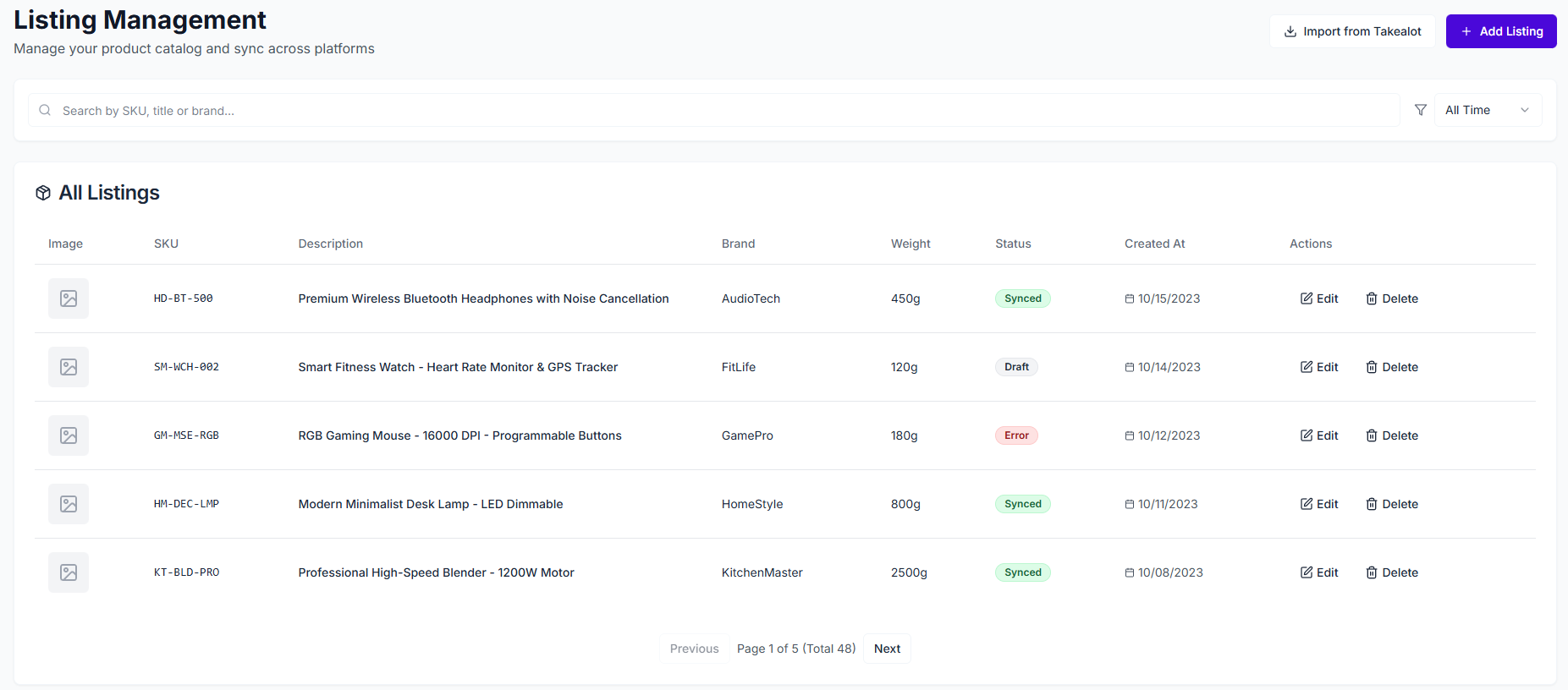
If you already sell on Takealot, the fastest way to make Takealot Listing Management useful is usually to begin with Import from Takealot.
That matters because catalog cleanup is easier when you are working from what already exists in the business, not from memory.
Once the listings are imported, you can review them in one table and see:
- image preview
- SKU
- description
- brand
- weight
- created time
- which platforms have already been synced
For many teams, this is the point where the catalog finally becomes reviewable instead of scattered.
What should be cleaned up before you publish or sync further?
Not every field deserves the same attention first.
What to review first in Listing Management | Why it matters | What usually goes wrong if you skip it |
|---|---|---|
SKU and title consistency | Prevents duplicate or confusing product records | Teams start treating similar products as different items |
Description and core attributes | Keeps the product easier to reuse later | Sync or publishing work becomes slower and messier |
Images | Avoids weak previews and incomplete product presentation | Listings look unfinished or require later rework |
Weight and packaging data | Helps downstream channel preparation | Operational and publishing issues surface later |
Synced platform visibility | Shows what has already moved beyond draft stage | Teams lose track of what is live where |
That is why a central product catalog is valuable even before you publish anything new. It gives you a better place to clean the record once instead of correcting the same product repeatedly.
Manual creation matters when the product does not exist yet
Imported listings are only half the story.
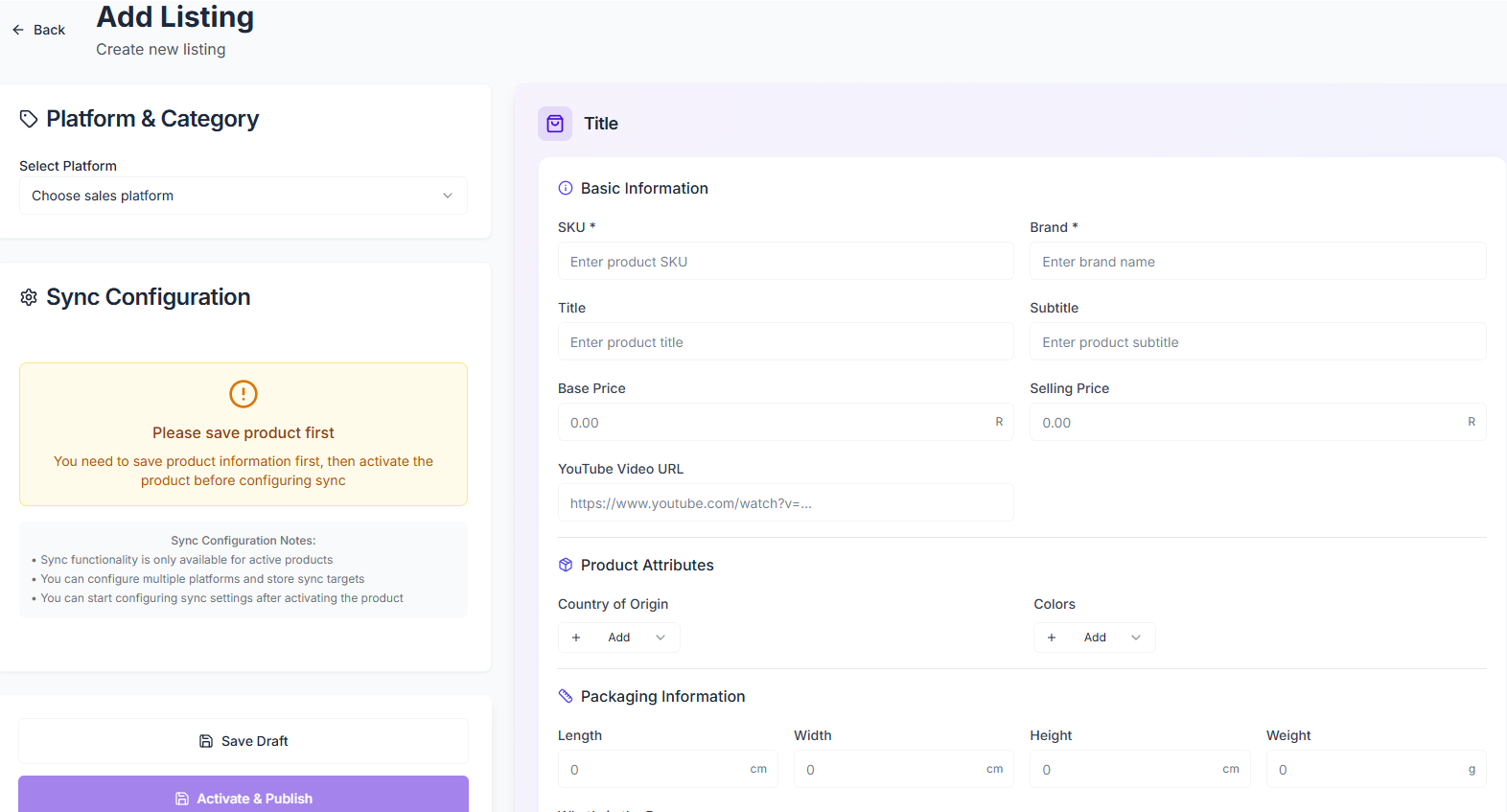
If you are building new products or preparing a listing before it goes live, Add Listing becomes the other important workflow. From there, the current page flow lets you:
- create a draft product record
- fill in core product information such as SKU, title, brand, description, price, and images
- select store and category context
- configure sync settings before publishing
That is useful because new listings often need to be shaped before they are ready for any channel.
A cleaner workflow for sellers growing beyond one channel
This is where Listing Management starts to feel operational rather than administrative.
A practical flow usually looks like this:
- Import existing Takealot listings or create new drafts.
- Clean the core product record until SKU, title, attributes, pricing, and images are usable.
- Check sync configuration before you push the listing further.
- Publish when the listing is ready, instead of fixing core data after the fact.
- Use Sync History if you need to trace what happened during sync.
For sellers preparing for multi-channel work, that sequence is usually safer than editing reactively platform by platform.
When Listing Management becomes most valuable
The page is especially useful when:
- your catalog has grown beyond a handful of products
- several people touch product data
- imported marketplace data needs cleaning before reuse
- you want one working catalog before more sync activity happens
- you need to know which listings are still drafts and which are already synced somewhere
In other words, Listing Management becomes more valuable as product operations become less simple.
FAQ
Is Listing Management only useful if I already sell on multiple channels?
No. It is already useful when you want one cleaner place to organize Takealot listing data before more sync work begins.
Should I import existing listings first or create everything manually?
If you already have live Takealot listings, importing first is usually faster. Manual creation is more useful for products that do not exist yet or need to be prepared from scratch.
Where should I look if a listing sync does not behave as expected?
Start with Sync History. That is the clearest place to review what happened during synchronization and identify where follow-up is needed.
Final takeaway
Good Takealot listing management is less about storing more products and more about reducing catalog friction.
Revenuealot Listing Management gives you a cleaner place to import what already exists, organize product data in one working catalog, and prepare listings before more sync or publishing work happens. That usually means fewer avoidable catalog mistakes later.
If your product data is currently spread across too many places, open Listing Management and bring the catalog into one working view first. Keep the Listing Management docs nearby if you want the detailed feature walkthrough while you work.