Warehouse Management (warehouse-management)
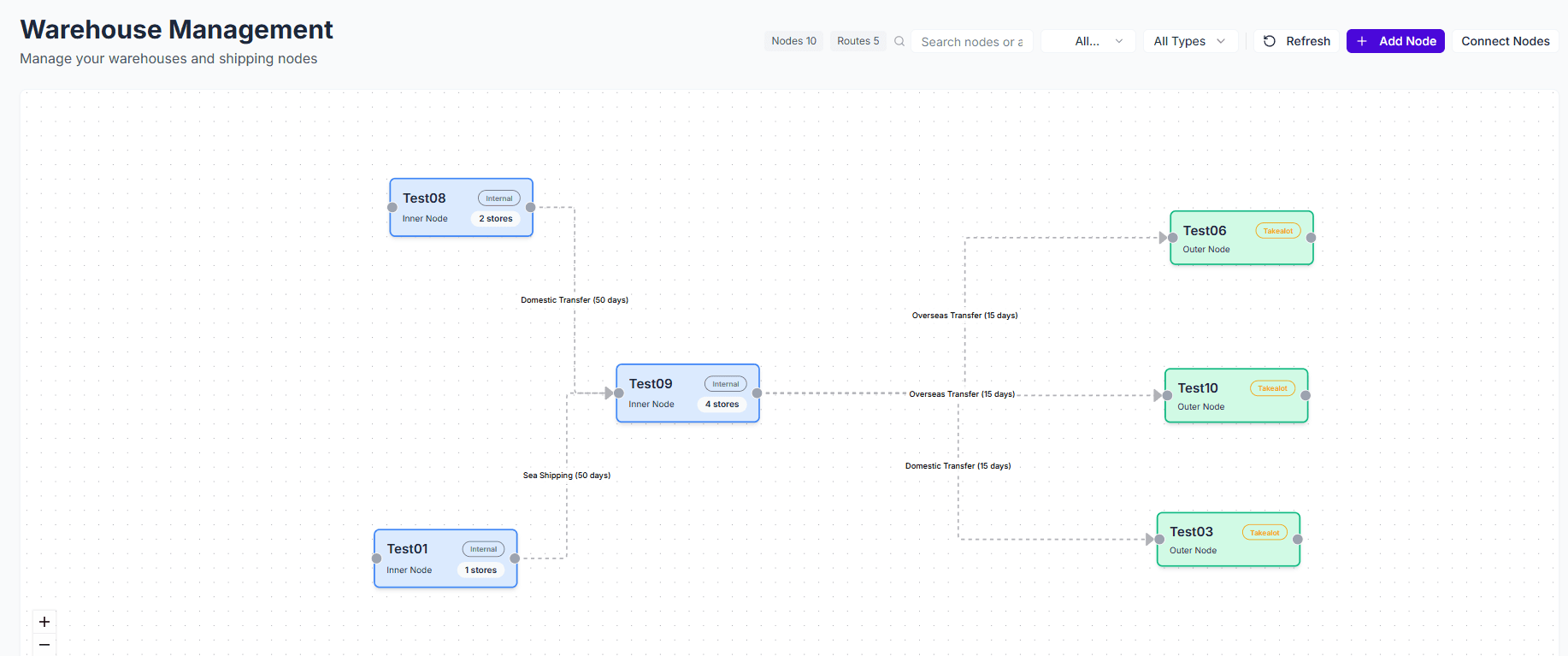
Warehouse Management is the structural page for replenishment routing. It defines nodes, store ownership, and transport paths, which directly affect where sales, stock, and lead time are attributed.
Core Value
- Build the warehouse network: connect internal nodes, external nodes, and transit routes.
- Clarify store ownership: decide which internal node owns each store.
- Affect replenishment output: node structure and transit time directly shape node-level recommendations.
- Support troubleshooting: make it easier to explain why one node behaves differently from another.
Quick Start
1. Create Internal Nodes
Start with internal nodes such as your own warehouses, transfer hubs, or overseas warehouses. These nodes usually own sales, stock, and replenishment output.
2. Create External Nodes
Add marketplace warehouses or other external nodes next. These are mainly used for synchronization and route visibility.
3. Bind Stores
Bind each store to the internal node that should own its replenishment results.
- One store should normally be bound to one internal node.
- If the binding is wrong, sales and replenishment output will shift to the wrong place.
Incorrect store bindings often do not fail loudly, but they directly affect sales attribution, inventory ownership, and recommended replenishment quantities.
4. Configure Transit Times
Finally, configure transit times between nodes so the main route is complete.
- Key fields include from node, to node, transit type, standard transit days, and description.
- If there is a transfer stage, it is usually better to model it as multiple route segments.
- Transit days should use stable and verifiable business values.
Feature Details
Node Types
- Internal nodes: usually your own warehouses, transfer hubs, or overseas warehouses that own replenishment output.
- External nodes: usually marketplace warehouses or outside locations mainly used for synchronization and route display.
Node Basics
The most important fields are node name, node type, platform, warehouse ID, and address. Internal nodes usually use Internal as the platform, while external nodes should use the real platform. Warehouse IDs should match upstream system identifiers whenever possible.
Store Bindings
Store bindings determine which internal node should own store-level sales and stock. Many “why does this node look wrong” problems can eventually be traced back to incorrect store binding.
Transit Times
Transit times define how nodes connect and how long goods take to move between them. Replenishment logic depends on this structure to determine reachability, route completeness, and lead time.
Common Questions
Q: Why do results look wrong after switching nodes in Inventory Management?
A: First check whether the node has correct store bindings and whether the route to that node is complete.
Q: Why can some nodes not form a path?
A: Usually because a required transit segment is missing or the node type is configured incorrectly.
Q: Why are results still wrong after updating store binding?
A: Also review the transit start node in Replenishment Settings, matching rules, and whether inventory has synchronized to the intended node.