Amazon Keyword Reverse
Amazon Keyword Reverse turns one competitor ASIN into a keyword research table. The current workspace combines collected Amazon Brand Analytics, SERP, and Amazon Ads bid signals so you can see where the ASIN is visible, where it is weak, and which keywords deserve listing or PPC attention. Currently limited to Amazon Australia.
Prerequisites
- ENTERPRISE plan access for
AMAZON_KEYWORD_REVERSE - A valid 10-character Amazon ASIN
- A marketplace with collected keyword reverse data
- DATA_EXPORT access if you need CSV export
Currently limited to Amazon Australia. More marketplaces will be noted here when enabled.
What It Answers
- Which keywords is this ASIN visible on?
- Is the visibility organic, sponsored, ABA-driven, or a mix?
- Which high-traffic terms have weak organic ranking and may be opportunity keywords?
- How crowded is the first page for each keyword?
- What PPC bid range does Amazon suggest for exact, phrase, and broad match?
- How fresh are the ABA, SERP, and Ads snapshots behind the table?
Quick Start
- Open Dashboard > Amazon > Keyword Reverse.
- Select the marketplace.
- Enter one ASIN, for example
B0C1234XYZ. - Click Search.
- Review the product preview, rating, reviews, price, and data window.
- Use the summary cards to understand distribution, traffic heat, opportunity count, and core word roots.
- Filter, sort, and configure columns before selecting rows for export.
Current Workspace
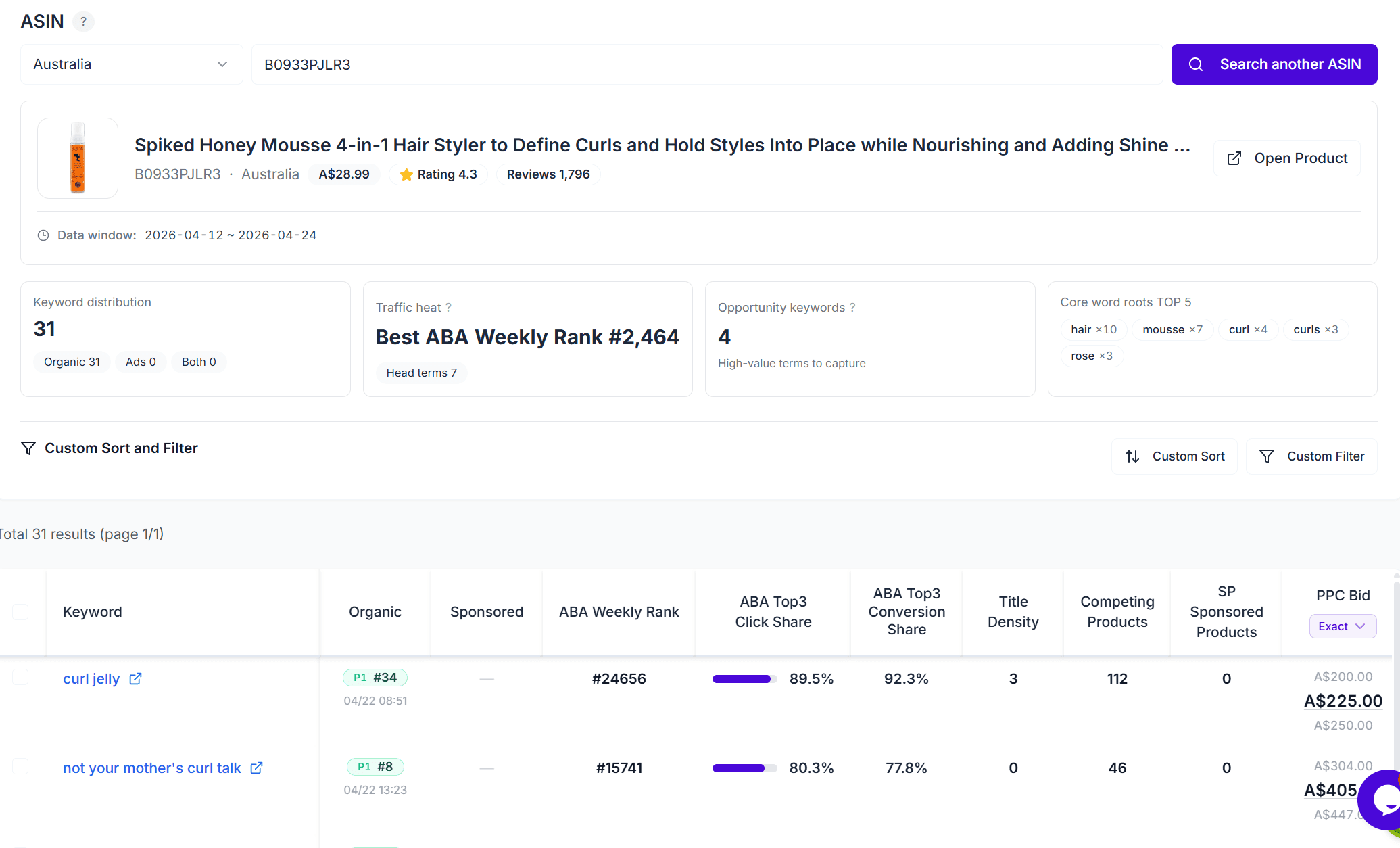
The page is structured around four working areas:
| Area | Purpose |
|---|---|
| Search panel | Select marketplace and enter one ASIN |
| Target preview | Show product image, title, brand, price, rating, reviews, and Amazon product link |
| Summary cards | Show keyword distribution, traffic heat, opportunity keywords, and top word roots |
| Results table | Show keyword-level ABA, SERP, competition, bid, filter, sort, column, pagination, and export controls |
Data Signals
| Signal | Source | How to Use It |
|---|---|---|
| Keyword | SERP / ABA / Ads stitched dataset | Primary search term for the row |
| ABA Weekly Rank | Amazon Brand Analytics | Lower rank means higher weekly search popularity |
| ABA Top3 Click Share | Amazon Brand Analytics | Measures how concentrated clicks are among the top three clicked products |
| ABA Top3 Conversion Share | Amazon Brand Analytics | Measures how concentrated conversions are among the top three clicked products |
| Organic rank | SERP snapshot | Shows this ASIN’s organic page and position |
| Sponsored rank | SERP snapshot | Shows this ASIN’s SP sponsored page and position when detected |
| Title density | SERP snapshot | Counts first-page products whose titles include the keyword |
| Competing products | SERP snapshot | Amazon-reported total product count for the keyword |
| SP sponsored products | SERP snapshot | Count of SP sponsored placements detected in the latest snapshot |
| PPC bid | Amazon Ads bid data | Exact, phrase, and broad min / suggested / max bid ranges |
Sorting, Filtering, and Columns
The current implementation supports:
- Custom filters across keyword text, ABA Weekly Rank, organic rank, sponsored rank, ABA shares, title density, competing products, SP sponsored products, and suggested bid
- Custom sort rules across the same major metrics
- Default sorting by ABA Top3 Click Share descending
- Column presets for Core Visibility, Opportunity Hunt, and Full Coverage
- Manual column visibility controls for search presence, market signals, and bid signals
Data Freshness
The product preview shows a normalized data window. The tooltip breaks it down by source:
- ABA: weekly coverage
- SERP: daily snapshot coverage when available
- Ads: daily bid-data coverage when available
Use this before acting on a keyword set. Empty values usually mean the source has not produced a matching snapshot for the selected ASIN and marketplace yet.
Export
CSV export works on selected keyword rows. The export includes the active ASIN, marketplace, filters, sort rules, and selected keyword IDs.
Export access is controlled separately by the DATA_EXPORT feature. Users without export access can still review the table if they have Amazon Keyword Reverse access.
Recommended Workflow
- Start with a direct competitor ASIN.
- Sort by ABA Top3 Click Share or ABA Weekly Rank to find high-intent keywords.
- Filter for keywords where organic rank is missing or outside the top 10.
- Check title density and competing products to estimate listing optimization difficulty.
- Review exact / phrase / broad bid ranges before sending keywords to an Ads workflow.
- Export selected rows for team review or offline analysis.
Troubleshooting
Invalid ASIN
Confirm the value is exactly 10 alphanumeric characters.
No keyword matches
The selected ASIN may not have collected keyword hits for the current marketplace, or active filters may be too narrow.
No bid data
Ads bid ranges are only shown when the collected Ads source includes matching bid data for that keyword.
Freshness looks incomplete
Different sources update at different cadences. Check the source-level tooltip before comparing ABA, SERP, and Ads values.